bahtinov-mask
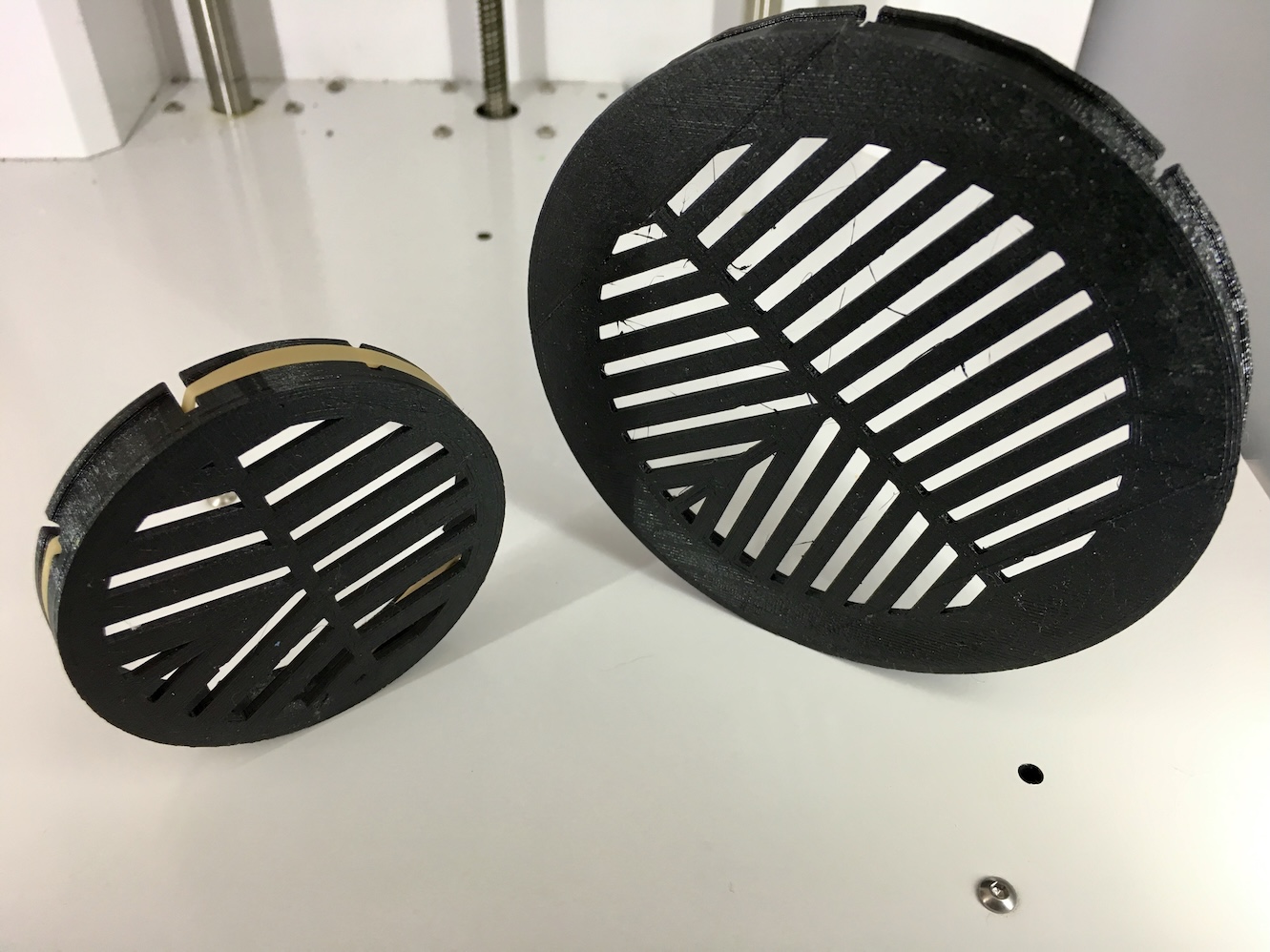

A parametric Bahtinov mask generator for astrophotography. Create custom-sized 3D printable focusing masks tailored to your telescope's aperture and tube diameter. Built with OpenJSCAD, this tool generates precision masks with adjustable bar width, gap spacing, and resolution for optimal focusing performance.
What is a Bahtinov Mask?
A Bahtinov mask is a precision focusing aid used in astrophotography and astronomy. It's a flat plate with a specific pattern of angled slits that, when placed over the front of a telescope's aperture, creates distinctive diffraction spikes around bright stars.
How It Works
When light from a star passes through the mask's pattern, it produces three distinct diffraction spikes:
- Two outer spikes created by the left and right slit patterns
- One central spike created by the middle angled slits
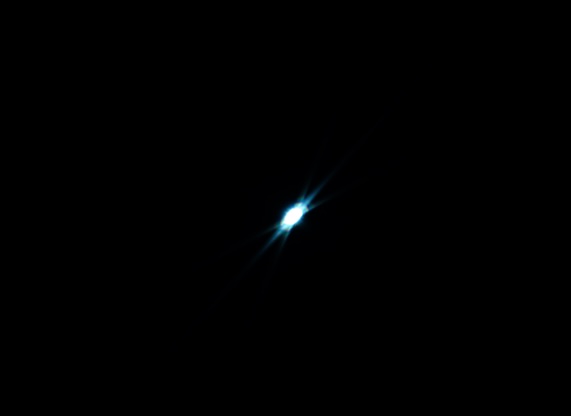
The key to achieving perfect focus is observing the position of these spikes:
- Out of focus: The central spike is offset to one side
- Perfect focus: The central spike is perfectly centered between the outer two spikes
- The direction and amount of offset indicates which way and how much to adjust focus
Uses and Benefits
- Precise Focusing: Achieves critical focus far more accurately than visual estimation alone
- Works with Any Telescope: Compatible with refractors, reflectors, and compound telescopes
- Fast and Reliable: Focusing can be done in seconds once you understand the pattern
- Essential for Astrophotography: Critical for capturing sharp details in deep-sky objects and planets
- Works with Dim Stars: Effective even with moderately bright stars
- Repeatable Results: Same technique works consistently across imaging sessions
When to Use
Bahtinov masks are particularly valuable when:
- Setting up for long-exposure astrophotography sessions
- Focusing in cold weather when thermal shifts affect focus
- Working with fast focal ratios where depth of focus is shallow
- Using cameras without live view or when screen visibility is poor
- Achieving focus with filters that shift the focal plane
Parameters
This parametric mask generator allows you to customize the mask to fit your specific telescope and requirements:
Part Selection
- Parts: Select which part of the Bahtinov mask to render (mask or slots)
Diffraction Pattern Method
- Method: Choose calculation approach:
- Calculated: Automatically calculates bar width and gap based on telescope focal ratio
- Explicit: Manually set bar width and gap values
Calculated Method (Focal Ratio)
When using the "Calculated" method, provide your telescope parameters:
- Scope Aperture: Clear aperture of the telescope (mm)
- Scope Focal Length: Focal length of the telescope (mm)
- Calc Scale Factor: Manual adjustment multiplier (0.1-20.0) for the calculated diffraction pattern. Automatically computed from aperture and focal length if provided, otherwise use this to fine-tune the pattern appearance.
Explicit Method
When using the "Explicit" method, manually set the diffraction pattern:
- Bar Width: Width of the opaque bars in the diffraction pattern (mm, 1.0-20.0). Affects the intensity of the diffraction spikes.
- Bar Gap: Gap between bars in the diffraction pattern (mm). Affects spike brightness - larger gaps create brighter spikes.
Telescope Dimensions (Common)
- Aperture: Clear aperture diameter of your telescope (mm, 10-2000). This is the main light-gathering opening.
- OTA Diameter: Outer diameter of the telescope tube (mm, 20+). Should be larger than the aperture to ensure proper fit.
Rendering Options
- Resolution: Rendering quality for curved surfaces. Higher values create smoother edges but slower rendering:
- Low (8,24)
- Normal (12,32)
- High (24,64)
- Very High (48,128)
- Ultra High (96,256)
View Options
- Center: Center the model at the origin for easier viewing in the 3D viewer.
Cutaway Options
- Enable: Enable cutaway view to see the internal structure of the mask.
- Axis: Choose which axis (x, y, or z) to cut through for the cutaway view.
Running
The jscad project bahtinov-mask uses gulp to create a dist/bahtinov-mask.jscad file and watches your source for changes. You can drag the dist/bahtinov-mask.jscad directory into the drop area on openjscad.org. Make sure you check Auto Reload and any time you save, gulp creates the dist/bahtinov-mask.jscad file, and your model should refresh.
start
npm start or npm run start will launch gulp, and create dist/bahtinov-mask.jscad . It also watches for file changes and recreates the dist file.
clean
Deletes the dist directory when you run npm run clean.
inject
Run gulp to combine the source files and inject the dependent libraries with npm run inject. Libraries are found using a gulp plugin that looks for a jscad.json file in a package. These files are combined and minimized before injecting into the dist file.
build
Build the vuepress static site by running npm run build. This script combines the readme with a vue-openjscad component to display a live view of the model. The baseUrl is set with the BASEPATH environment variable. It defaults to /bahtinov-mask/. When hosted on GitLab, the .gitlab-ci.yml CICD file uses this script to publish to GitLab Pages.
See the vue-openjscad package for information on modifying options like the grid or initial camera position.
serve
Run vuepress in dev mode with npm run serve. This script watches for file changes and hot reloads changes made to the README file. Changes to the model are not automatically reloaded; a manual reload is required.
jscad-utils
The example project uses jscad-utils. These utilities are a set of utilities that make object creation and alignment easier. To remove it, npm uninstall --save jscad-utils, and remove the util.init(CSG); line in bahtinov-mask.jscad.
Other libraries
You can search NPM for other jscad libraries. Installing them with NPM and running gulp should create a dist/bahtinov-mask.jscad will all dependencies injected into the file.
For example, to load a RaspberryPi jscad library and show a Raspberry Pi Model B, install jscad-raspberrypi using npm install --save jscad-raspberrypi. Then return a combined BPlus group from the main() function.
main() {
  util.init(CSG);

  return RaspberryPi.BPlus().combine();
}

// ********************************************************
// Other jscad libraries are injected here.  Do not remove.
// Install jscad libraries using NPM
// ********************************************************
// include:js
// endinject
OpenJSCAD.org
If you publish the dist/bahtinov-mask.jscad file, you can open it directly in openjscad.org by using the following URL:
http://openjscad.org/# + the url to your file. Gist
You can save your file to a GitHub gist and append the URL to the raw gist.
Gitlab Snippet
If you save to a gitlab public snippet, you can open it using the following URL:
https://openjscad.org/#https://gitlab.com/snippets/1795323/raw.jscad
Make sure you change the snippet id to the correct value and add .jscad at the end.
License
ISC © John Cole